Introduction
Local-first architecture is an approach to building applications that work directly on your computer or device without depending on a remote server. In simple terms, it means all your data lives locally on your system, giving you complete privacy, ownership, and security over your information. It can also be seen as a method of developing offline-first software. apps that function fully even without an internet connection and only sync data with the cloud or server once connectivity is available. This approach helps create faster, more reliable, and privacy-respecting applications that put users in control of their data.
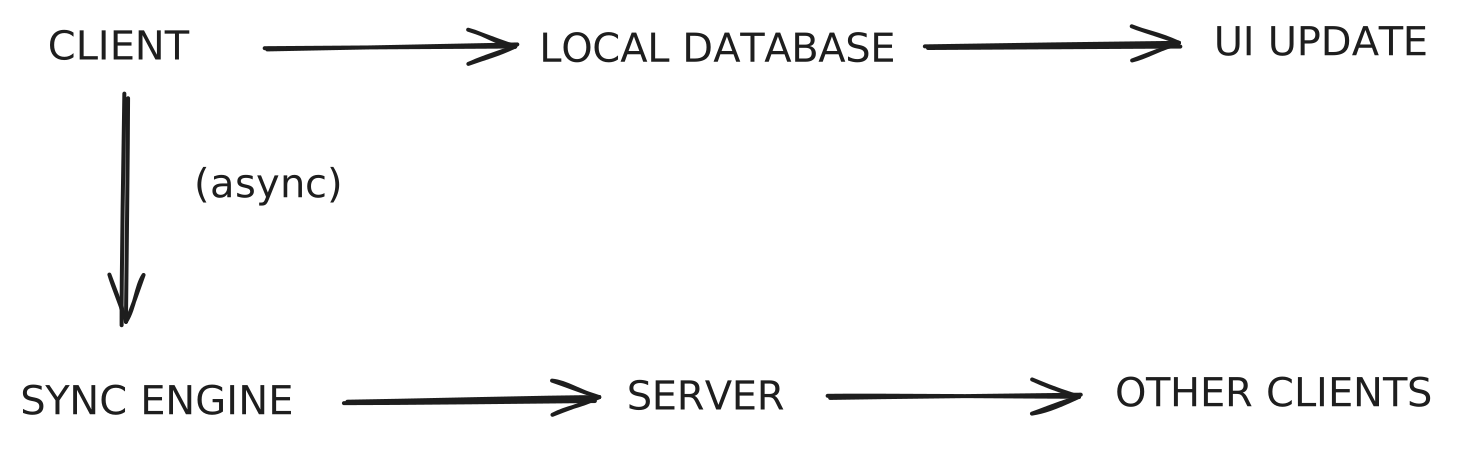 Local-First Architecture
Conflict-free Replicated Data Types
Let’s say you’re developing a local-first collaboration app, and two users make offline edits to the same document. Once they reconnect, a conflict would typically occur and that’s precisely the problem CRDTs are designed to solve.
So, what are CRDTs
CRDTs are special kinds of data structures designed to handle this exact problem. They allow multiple users or devices to make changes to the same data independently and concurrently, and then merge those changes automatically without losing anyone’s work or requiring manual conflict resolution.
You can think of CRDTs as an upgraded version of regular data types (like maps, lists, or sets) that “know” how to merge changes in a mathematically consistent way. When a local database and a remote database both have updates, CRDTs ensure that all versions eventually sync to the same final state no overwrites, no data loss.
One of the most popular libraries that implements CRDTs today is yjs, which powers real-time collaboration in editors, whiteboards, and note-taking apps.
What makes CRDTs special
They are shareable, conflict-resistant data types built for distributed systems. CRDTs ensure that no matter how many people edit the same document or how long they’ve been offline, everyone will eventually see the same consistent version of the data.
How Do We Store Data Locally
In local-first applications, data is stored directly on the user’s device using a local database.
For web applications, the most common option is IndexedDB, which is supported by all modern browsers. It’s preferred over alternatives like SQLite in browser-based environments because it’s built into the web platform itself.
What Is IndexedDB?
IndexedDB is “a low-level API for client-side storage of significant amounts of structured data, including files and blobs.”
In simpler terms, it’s a database built into your browser that allows you to store and retrieve complex data not just simple key-value pairs like in localStorage. IndexedDB supports large data sizes, indexing, transactions, and queries, making it powerful enough to support local-first web applications.
const DATABASE_NAME = "todoDatabase";
const STORE_NAME = "todos";
const DB_VERSION = 1;

export interface Todo {
  id?: number;
  task: string;
  completed: boolean;
}

export const initDB = async (): Promise<IDBDatabase> => {
  return new Promise((resolve, reject) => {
    const request = indexedDB.open(DATABASE_NAME, DB_VERSION);

    request.onupgradeneeded = (event) => {
      const db = (event.target as IDBOpenDBRequest).result;
      if (!db.objectStoreNames.contains(STORE_NAME)) {
        db.createObjectStore(STORE_NAME, {
          keyPath: "id",
          autoIncrement: true,
        });
      }
    };

    request.onsuccess = () => resolve(request.result);
    request.onerror = () => reject(request.error);
  });
};

export const getTodos = async (): Promise<Todo[]> => {
  const db = await initDB();
  return new Promise((resolve, reject) => {
    const transaction = db.transaction(STORE_NAME, "readonly");
    const store = transaction.objectStore(STORE_NAME);
    const request = store.getAll();

    request.onsuccess = () => resolve(request.result);
    request.onerror = () => reject(request.error);
  });
};

export const addTodo = async (todo: Todo): Promise<void> => {
  const db = await initDB();
  return new Promise((resolve, reject) => {
    const transaction = db.transaction(STORE_NAME, "readwrite");
    const store = transaction.objectStore(STORE_NAME);
    const request = store.add(todo);

    request.onsuccess = () => resolve();
    request.onerror = () => reject(request.error);
  });
};

export const deleteTodo = async (id: number): Promise<void> => {
  const db = await initDB();
  return new Promise((resolve, reject) => {
    const transaction = db.transaction(STORE_NAME, "readwrite");
    const store = transaction.objectStore(STORE_NAME);
    const request = store.delete(id);

    request.onsuccess = () => resolve();
    request.onerror = () => reject(request.error);
  });
};

export const updateTodo = async (updatedTodo: Todo): Promise<void> => {
  const db = await initDB();
  return new Promise((resolve, reject) => {
    const transaction = db.transaction(STORE_NAME, "readwrite");
    const store = transaction.objectStore(STORE_NAME);
    const request = store.put(updatedTodo);

    request.onsuccess = () => resolve();
    request.onerror = () => reject(request.error);
  });
};
This is a basic example of how IndexedDB works. However, there are several libraries that make working with it much easier. one popular option is Dexie.js.
What Is a Service Worker
A Service Worker is a script that runs in the background of your browser and acts as a proxy between your web application, the browser, and the network.
In simple terms, it helps your web app work offline by caching the essential files and resources it needs to run like HTML, CSS, JavaScript, and images. When a user revisits the site, the service worker can serve these cached files instead of fetching them again from the internet, allowing the app to load instantly even without a network connection.
When combined with IndexedDB, the service worker handles the cached application code, while IndexedDB stores the data your app uses. Together, they make it possible for your entire application both its interface and content to load locally from your device.
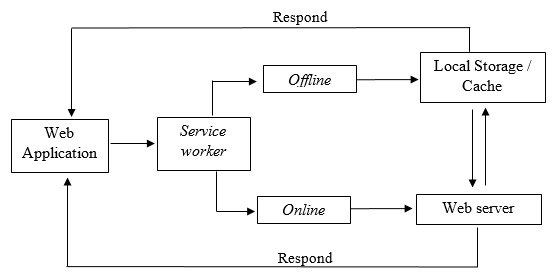
The Most Basic Form of a Local-First App
In its simplest form, a local-first app works like this: when you first load the app, its code is cached by a service worker, and the data is stored in IndexedDB. This means that when you go offline or even when you’re online the app can load directly from your local database instead of fetching everything from the network.
Where things start to get more complex is when you need to go beyond local storage. Most real-world applications eventually need a remote data store a server or cloud database to sync and back up user data. Managing this sync process between the local database and the remote one is what adds complexity to local-first design.
The main advantage of a simple local-first app is that you get near-instant reads and writes, which makes the app feel incredibly fast and responsive.
For example, think about a basic to-do app. If it takes noticeable time to fetch your to-dos from the network every time you open it, that’s a perfect case where a local-first approach can make a big difference your data loads instantly from your device, even without an internet connection.
7 Ideals for Ownership and Collaboration
Here are the seven ideals that define local-first development:
1. No Spinners: Your Work at Your Fingertips
The Problem with Cloud Apps
Many cloud applications suffer from latency issues, where users experience delays between their actions and the software’s response. This can be frustrating, especially when you’re in the flow of creativity or productivity.
The Local-First Solution
Local-first software addresses this issue by keeping the primary copy of your data on your local device. This means that all operations whether reading, writing, or modifying files are performed instantly without the need for server communication. Users can work without interruptions, ensuring that their creative process remains uninterrupted.
2. Your Work is Not Trapped on One Device
The Challenge of Device Lock-In
In a world where users rely on multiple devices, being locked into a single device can hinder productivity. Cloud applications often require an internet connection to access data, making it difficult to switch between devices seamlessly.
Embracing Local Storage
Local-first applications store data locally on each device, allowing users to access and edit their work from anywhere. Whether you’re jotting down ideas on your smartphone, organizing them on your tablet, or finalizing them on your laptop, local-first software ensures that your work is always within reach.
Benefits
- Cross-Device Synchronization: Changes made on one device are automatically synced to others when a connection is available.
- Flexibility: Users can work on their terms, regardless of their location or device.
3. The Network is Optional
The Reality of Connectivity Issues
Internet connectivity can be unreliable, especially in remote areas or during travel. Many cloud applications require a constant connection, which can be a significant barrier for users who need to work offline.
Offline Capabilities of Local-First Software
Local-first software is designed to function without an internet connection. Users can read and write data locally, and any changes made while offline will sync automatically once a connection is reestablished. This is particularly beneficial for professionals who need to work in the field, such as journalists or researchers.
Benefits
- Uninterrupted Workflow: Users can continue working without worrying about connectivity issues.
- Data Synchronization: Changes are seamlessly integrated once the user is back online.
4. Seamless Collaboration with Your Colleagues
The Complexity of Collaboration in Cloud Apps
While cloud applications have made collaboration easier, they often come with challenges such as version conflicts and the need for constant internet access. This can lead to frustration and inefficiencies when multiple users are working on the same document.
Real-Time Collaboration in Local-First
Local-first software aims to provide a collaborative experience that rivals the best cloud applications. By treating the local copy of the data as the primary version, users can collaborate in real-time without the risk of conflicts. Changes made by one user are instantly visible to others, fostering a more dynamic and interactive environment.
Benefits
- Conflict-Free Editing: Users can work simultaneously without worrying about overwriting each other’s changes.
- Enhanced Team Dynamics: Real-time collaboration encourages teamwork and creativity.
5. The Long Now: Ensuring Data Longevity
The Risk of Cloud Dependency
One of the significant drawbacks of cloud applications is the reliance on service providers. If a service shuts down or changes its terms, users may lose access to their data permanently.
Local-First Software for Data Preservation
Local-first software prioritizes data longevity by ensuring that users have full control over their files. As long as users have a copy of their data and the necessary software, they can access their work indefinitely, regardless of the status of the original service provider.
Benefits
- Data Independence: Users are not at the mercy of third-party services.
- Future-Proofing: Files can be preserved and accessed for years to come, even as technology evolves.
6. Security and Privacy by Default
The Vulnerability of Centralized Data
Cloud applications often store user data in centralized databases, making them attractive targets for hackers. Users may also be concerned about how their data is used by service providers.
Enhanced Privacy with Local-First Software
Local-first applications store data on users’ devices, reducing the risk of unauthorized access. Additionally, many local-first applications implement end-to-end encryption, ensuring that even if data is stored on a server, it remains secure and private.
Benefits
- Reduced Risk of Data Breaches: With data stored locally, the attack surface is minimized.
- User Control Over Data: Users can manage their data without interference from service providers.
7. You Retain Ultimate Ownership and Control
The Illusion of Ownership in Cloud Apps
While users may think they own their data in cloud applications, the reality is that service providers often retain significant control over how that data is accessed and used. This can lead to restrictions and limitations that frustrate users.
Empowering Users with Local-First Software
Local-first software redefines ownership by ensuring that all data is stored locally on users’ devices. This means users have complete control over their files, including the ability to copy, modify, and delete them as they see fit.
Benefits
- Full Agency: Users can manage their data without restrictions imposed by service providers.
- Responsibility and Empowerment: With ownership comes the responsibility to maintain backups and protect against data loss, but many users find this trade-off desirable.
References
Resources
- lofi.so
- localfirstsoftware.com
- Unexpected benefits of going local-first - Tuomas Artman(Linear's CTO)
Conclusion
This isn’t an advocacy for abandoning the client-server architecture but rather an effort to raise awareness about a relatively new approach to building software that enhances user experience. Apps like Linear and Obsidian have already proven the potential of this model.
Local-first applications are still emerging technologies, supported by a passionate and growing community continuously pushing the boundaries of what’s possible.
I’m relatively new to this concept myself, but I plan to keep exploring, experimenting, and learning more about it. Once I make significant progress on my current project (not local-first), I’ll definitely dive deeper and share my findings probably on LinkedIn, if I don’t overthink it. 😅